VGVA.com redesign: the frontend

Layout-wise, I made a few changes to VGVA.com. First, a much wider default width (from 800 to 1024 pixels) allowed me a second sidebar. After a lot of experimentation and feedback from the VGVA board, I displayed our sponsors in two cycling blocks (thank you, jQuery Cycle Plugin!), plus a separate block for new “official supplier sponsor” volleyballstuff.net. Team sponsors should be pleased, at least; their logos had previously been stuck below the footer.

(Part 2 of my recap of the VGVA.com redesign. Part 1 is here)

Layout-wise, I made a few changes to VGVA.com. First, a much wider default width (from 800 to 1024 pixels) allowed me a second sidebar. After a lot of experimentation and feedback from the VGVA board, I displayed our sponsors in two cycling blocks (thank you, jQuery Cycle Plugin!), plus a separate block for new “official supplier sponsor” volleyballstuff.net. Team sponsors should be pleased, at least; their logos had previously been stuck below the footer.

The left sidebar displays news and matchmaker listings, two things previously confined to a couple pages each, as well as section sub-menus where appropriate, for easier navigation. Speaking of News, I decided to scrap the news archive page from the previous design. I’d gotten the idea from the Out on Screen site, but after a while archiving past events felt pretty useless (especially since almost all these events recur every year). I don’t have the numbers to back up my guts, but it makes for a simpler architecture and nobody’s complained yet, so there you are.

The matchmaker section hasn’t changed much, as far as the user would tell, except I did implement an AJAX-based login/signup process (which falls back to plain synchronous forms if the browser isn’t running JavaScript).

Lastly, I tried my hand at this responsive design thing I’ve heard so much about. Nothing too fancy, just narrowing or removing the width of the left sidebar for smaller screens, plus taking out some stylistic frills (e.g.: rounded corners) for mobile browsers.

So there you have it! This redesign consumed so much of my free time for months, but now I can finally relax a bit…

VGVA.com redesign: the backend

The first and most obvious aspect of this redesign was moving from a few homebrewed PHP scripts to a proper CMS, namely WordPress. The advantages are obvious—revision history, a full text editor, taxonomies, etc… etc…—are obvious. But I needed a lot more than just a basic CMS for this site, and WordPress was ready:

The first and most obvious aspect of this redesign was moving from a few homebrewed PHP scripts to a proper CMS, namely WordPress. The advantages—revision history, a full text editor, taxonomies, etc… etc…—are obvious. But I needed a lot more than just a basic CMS for this site, and WordPress was ready:

Multiple custom post types

I’ve got 2 now, and will be implementing a third in the near future. News display on the front page and the left sidebar, and require not just a start date but an expiry date. Newsletters have no custom fields but are mailed out to our membership upon publication. Last comes Skills, a series of tutorials sent out every couple of weeks by one of the mentors to the intermediate players. Right now they’re only implemented as static pages with hard-coded dates—bit of a rush job, I admit.

Control panel

Some pages, such as tournaments and registration pages, have time-sensitive content. Previously I kept the different versions of these pages in separate files, swapping them out via crontabs. This worked well enough, but it was definitely not friendly to non-techy people. My solution was to keep different versions in separate private sub-pages (tidier that way), with the master (public) page’s content consisting only of a banner and a shortcode.

This shortcode would output the content of one of the sub-pages, based on the current time and whatever deadlines apply.

add_shortcode( 'vgva_summerfling_body', 'vgva_summerfling_body_func' );

function vgva_summerfling_body_func($atts) {
  $now = time();
  $fling_over = get_option('vgva_fling_date') + 86400; //the day after it ends
  if($now < $fling_over) {
    if(($now >= get_option('vgva_fling_upcoming') && $now < get_option('vgva_fling_reg_open')) || get_option('vgva_fling_upcoming') > get_option('vgva_fling_reg_open')) {
      //summer fling upcoming
      $pageId = 788;
    } else {
      //summer fling registration open
      $pageId = 790;
    }
  } else {
    //summer fling inactive/over
    $pageId = 786;
  }
  $page = get_page($pageId);
  return apply_filters('the_content', $page->post_content);
}

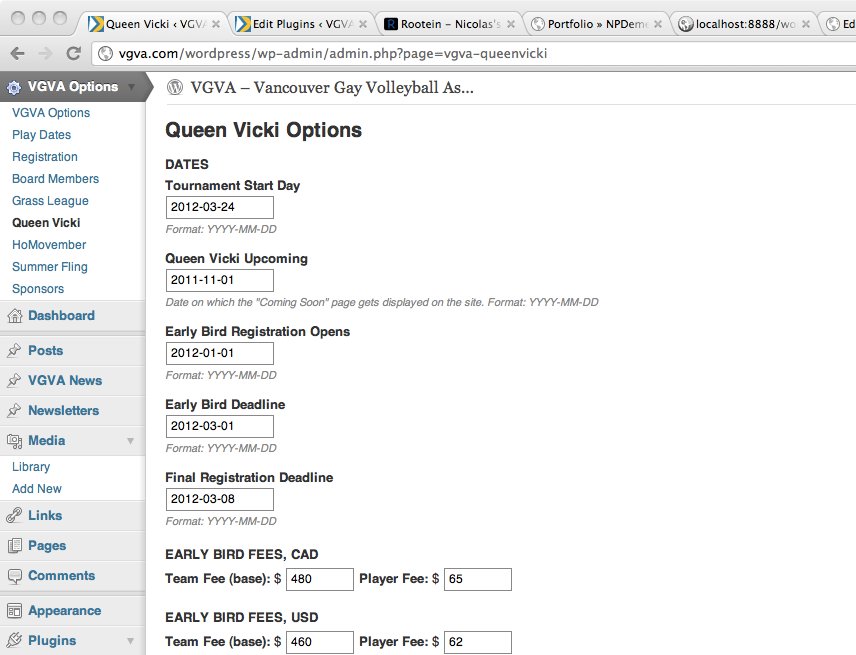
How are these deadlines set? Through a “control panel” consisting of several pages, each setting one aspect of the site’s configuration. Registration, board members, tournaments, etc… Basically, if it influences the site’s behaviour, or appears on more than one place on the site, it goes in the control panel.
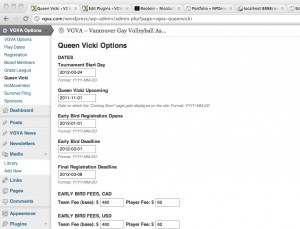
So, non-techy people can easily update the pages and the configuration. The logic tying everything together is still my domain, but once I’ve ironed out all the bugs that’ll never needs to change unless new features are required.

Speaking of shortcodes, the sub-pages (and hell, almost every page on the site) makes generous use of them. It was a pain to set up, but now I can sit back and relax. No more global search-and-replace to update board membership and contact info (the chair’s name and email, especially, shows up on many different pages.)

add_shortcode( 'vgva_fling_reg_fee', 'vgva_fling_reg_fee_func' );

function vgva_fling_reg_fee_func($atts) {
  setlocale(LC_MONETARY, 'en_US');
  return money_format('%n',get_option('vgva_fling_fee'));
}

One pet peeve I have is that, unlike Drupal, WordPress does not have built-in logic to generate the markup for configuration pages, so not only do I have to do the hard work, there’s no accepted standard. Hmph. Oh well.

The Matchmaker

The matchmaker logic didn’t change a whole lot: I tweaked the data structure here and there, but nothing substantial. The real pain was making custom forms work in WordPress, with the custom templates that feel very… hacky and awkward. Again, Drupal is way easier for heavy custom development. But hey, I knew what I was getting into.

One last thing: all this custom logic (custom post types, matchmaker) was implemented as plugins, not part of the active theme. It’s just common sense, right?

So there you have it, a peek into the back-end development of VGVA.com. It was by far my most involved project, and I enjoyed every minute of it. I learned so much about WordPress’s guts, and got some excellent hands-on experience.

(Next up: a bit about the redesigned front-end)
The VGVA.com redesign

For several months, I’ve been hard at work redesigning the Vancouver Gay Volleyball Association website. Longtime readers will remember previous posts wherein I expressed my insecurities, then my excitement at tackling its redesign in 2008. Now in 2011 comes another redesign, even more extensive.

For several months, I’ve been hard at work redesigning the Vancouver Gay Volleyball Association website. Longtime readers will remember previous posts wherein I expressed my insecurities, then my excitement at tackling its redesign in 2008.

Now in 2011 comes another redesign, even more extensive. I moved the site to WordPress instead of homebrewed PHP scripts, jiggered the layout and structure, and made extensive under-the-hood changes to allow non-techy people to update content, announcements, and time-sensitive information (tournaments, registration) without mucking about with HTML and SQL.

In the next couple of posts I’ll go into more detail about the changes I’ve made, and what I’ve learned along the way.

Content type descriptions in node/add

Most of my Drupal experience in the last year has been either purely back-end development, or superficial front-end stuff: JavaScript, AJAX, tweaking templates and styles, that sort of thing. But in the last couple of weeks, in two different projects, I’ve been digging more into theme development, menu management, and various other issues.

Most of my Drupal experience in the last year has been either purely back-end development, or superficial front-end stuff: JavaScript, AJAX, tweaking templates and styles, that sort of thing. But in the last couple of weeks, in two different small-scale projects, I’ve been digging more into theme development, menu management, and various other issues site admin issues. It’s fascinating stuff, though hard to wrap my head around. Plain old development on the Drupal platform was a lot more straightforward, at least to me. Still, it’s good to get out of my comfort zone, right?

Here’s one particular problem I dealt with, which I had a hell of a time googling for: the client wanted to change the content type descriptions on the “Add Content” (/node/add). It took me some trial and error and googling to find out that’s taken from two places:

  1. The content type description, as set in each Content Type.
  2. Overriding that if they exist, the descriptions of the “Add Content” menu item’s children.

There are still a lot of things I’m figuring out, like how to change the text on top of the Add Content page. Seems a simple thing, right? Maybe it is if you know how, but I don’t. It’s definitely not the menu system, though interestingly the menu item description does display as expected on its parent menu page…