You Can’t Take The Sky From Me

Hey, who’d have thought I’d be back at the planetarium so soon?

This Saturday I went to Can’t Stop The Serenity, a fundraiser by the BC Browncoats to benefit Equality Now and the BC Women’s Hospital & Health Centre.

Hey, who’d have thought I’d be back at the planetarium so soon?

This Saturday I went to Can’t Stop The Serenity, a fundraiser by the BC Browncoats to benefit Equality Now and the BC Women’s Hospital & Health Centre. There was a silent auction, an evil laughs contest, and a whole lot of Whedon- and Firefly-related things to watch. Including a few costumes, though not as many as I expected. There was a fair number of Jayne hats, a group of three people (including at least one girl) dressed as cowboys (i.e.: Bad Horse’s chorus), and one woman dressed like a Vulcan in a blue TOS uniform. Huh. Didn’t see that coming. But I’ll say this for the Firefly/Serenity crowd, they’re pretty ecumenical. The auction items ranged all over the sci-fi spectrum, from an awesome foot-high plush Dalek to signed Stargate: Atlantis posters.

First up was Dr. Horrible’s Sing-Along Blog. I actually hadn’t watched it in its entirety in a long time, which is a shame because it’s a damn good story with damn good songs. (Usually I just watch “Brand New Day” because it’s catchy and evil Neil Patrick Harris is fucking sexy. Well, sexier.)

Browncoats: Redemption is a fan-made film set shortly after the events of Serenity, and starring the crew of yet another freelance transport. It’s got a neat plot, so-so acting, and crappy special effects, but hey, I’m not going to make a big deal about that.

We also watched Whedon’s acceptance speech, from when he received an award from Equality Now (“Honoring Men on the Front Line”) back in 2006. And… okay, I’m going to be contrary here, but this is what I think:

Whedon isn’t all that. There, I said it.

Oh, don’t get me wrong, he’s done some good TV. I love Buffy (well, mostly the first 3 seasons, though it only started sucking in seasons 6 and 7) and quite liked Angel though I kind of lost interest about halfway through. Firefly is hella fun, though there’s a lot more style than substance. And I fucking adore Dr. Horrible. (Never watched Dollhouse.)

But his Equality Now acceptance speech really got my dander up. The way he went on and on about creating strong female characters seemed incredibly smug and self-congratulatory. Buffy is strong, yes, in that she can beat up any living creature and most nonliving ones. But when you get right down to it I don’t see how that makes her really special, or even especially feminist. It certainly doesn’t make her revolutionary, because William Moulton Marston has Whedon beat by 50 years.

Not to mention that whatever character development Buffy had was absolutely demolished in the later seasons, what with her creepily abusive relationship with Spike, turning into a one-dimensional cold bitch to the Potential Slayers, Brother Caleb’s over-the-top (and not in a good way) misogyny, and here’s the kicker: discovering that Slayer power really came from primordial male wizards, who created the original Slayer in a weird act of magical borderline rape. Wow, way to crap on seven years’ worth of female-centered mythos there, Joss.

The only comparable characters (that I know of) in his other shows are the badass warrior Zoe, and—here’s a better match—River, who rather like Buffy is a small, harmless-looking girl that had her powers thrust upon her against her will (in this case, nasty medical experiments). Huh. Never saw that pattern before.

No, I don’t think Whedon was trying to make any kind of statement with Buffy, or any of his later characters. I think he just lucked into a character that (with great writing and a fine supporting cast) got picked up as a feminist icon. That said, I’ll give him props for:

  • Being a feminist man, and using his fame to campaign for women’s equality. It is a big deal, in real life as well as fiction.
  • Being brutally honest. In his speech, one of his many answers to “Why do you always write these strong women characters?” was “because it’s hot”. (Incidentally, Marston’s bondage fetish formed a big part of the early Wonder Woman mythos).
  • Writing at least one series with something close to gender parity. Of Firefly’s 9 main characters, 4 are women. Actually, since the two who died in Serenity were men, that brings us to a female majority. A nice variety of characters, too, from the hardened warrior to the sweet wrench-wielding nerd to the crazy psychic dancing timebomb, to the—oh, let’s be honest, Inara is 100% fetish fuel.

Well, enough contrariness. Sorry, had to get that off my chest. I really did have a great time Saturday, and I’ll be sure to go next year.
My Adventure With WordPress 3.0, Part 1: The Install

They say the journey of a thousand miles begins with a single step. With that in mind, this is the first of a series of posts about me exploring Wordpress 3.0. I’m working on a new project involving a fresh 3.0 install, so I thought I’d jot down a few thoughts on the install process.

They say the journey of a thousand miles begins with a single step. With that in mind, this is the first of a series of posts about me exploring WordPress 3.0. I’m working on a new project involving a fresh 3.0 install, so I thought I’d jot down a few thoughts on the install process.

For one, it’s dead easy. Granted, Dreamhost lets you the one-click install thing, which takes care of all the messy db details, but I still remember going through a few more screens when I initially installed WP (granted, that was a few years ago, so maybe I’m wrong).

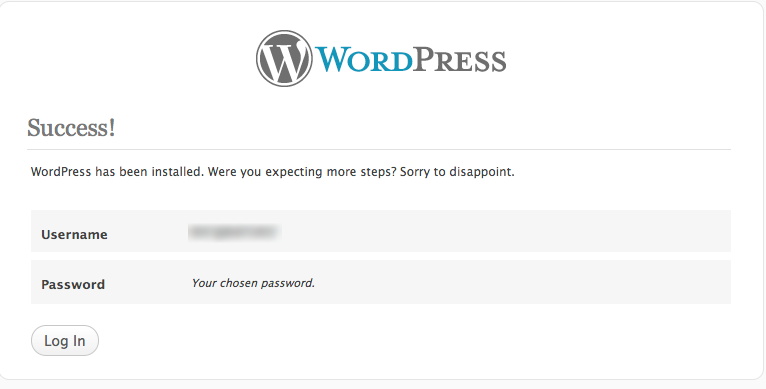
One interesting aspect of the one-screen config process is that you get to choose your admin account name, a great security feature

Success!

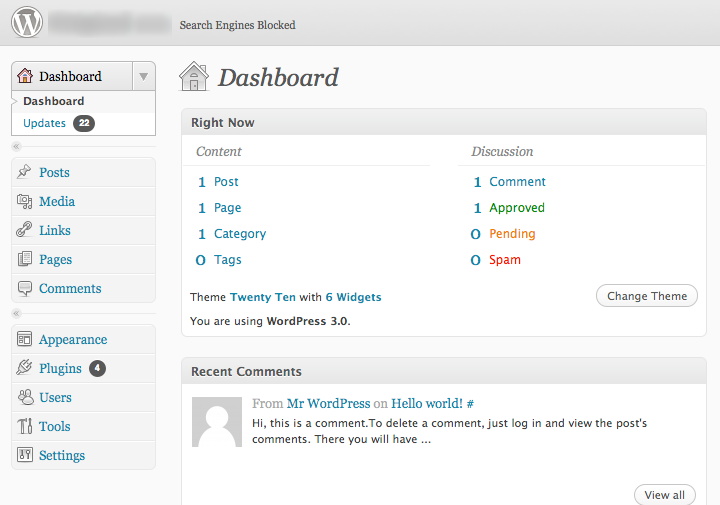
Another interesting tidbit (very bottom of the initial config screen) is the option to block search engines. For the moment I am blocking them, because this site is obviously not ready for prime time. Site visibility is managed in the Settings > Privacy page.

Search Engines Blocked

Mind you, that setting’s not unique to 3.0, I’d just never noticed it before.

Next up: probably something about child themes, or custom post types. I’ll be working with both those features.

Vancouver WordCamp

So I’m finally blogging about WordCamp. I had a great time, met some cool people, and learned so much I almost needed an extra brain. Well, I had my iPhone, does that count? Now I just need to digest everything I’ve absorbed and apply it to my present and future projects.

So I’m finally blogging about WordCamp. I had a great time, met some cool people, and learned so much I almost needed an extra brain. Well, I had my iPhone, does that count? Now I just need to digest everything I’ve absorbed and apply it to my present and future projects.

It was such a beautiful day. I strolled down to Vanier Park via Burrard Bridge, unused to getting up so early on a Saturday, but not really minding, because the streets were peaceful and quiet. Then I got a little lost, because I wasn’t too clear on just where the Vancouver Museum was. Turns out, it’s attached to the Planetarium. Huh. How long has that been going on?

Socializing Your WordPress Blog

The first presentation was by Nadia Aly, showing various social media tools to add to your blog. Facebook, Twitter, Digg, Stumbleupon, all these and more should be used to bring more readers in, and add value for your established readers.

  • Tweetmeme, a retweet button. Also shows how many times a post has been tweeted. Available as a WordPress plugin or standalone as a bit of Javascript code.
  • Facebook share. Same as above, but with Facebook.
  • Social Bookmarking Reloaded adds a series of graphical links to all kinds of social media sites, from Facebook to Delicious to… a whole bunch I’ve never heard of. Seriously, there are over 60 options.
  • Flickr Photo Album, a plugin that allows you to insert Flickr photo sets or individual photos in your posts
  • WP Followme adds a Twitter “Follow Me” badge to your blog
  • Facebook Like button plugin: exactly what it says on the tin
  • Twitoaster automatically tweets your posts as they’re published.

And that’s only the tools Nadia explicitly recommended, I’m sure there are a million more.

WordPress Dev Environments: MAMP and WAMP

Wouldn’t it be great if you could set up a WordPress install right on your own machine, to poke and tweak and experiment to your heart’s content, play with the most unstable beta builds without worrying about taking down your live site? John Biehler introduced us* to MAMP (Mac, Apache, MySQL, PHP), a completely self-contained environment separate from the existing Apache server on MacOS. Wish I’d known about this before; in the future I won’t have to set up a subdomain with a separate WordPress build to test new themes. Hey, live and learn.

(* Well, me, at least)

WordPress As CMS

A panel of three speakers (Cameron Cavers, Christine Rondeau and Dave Zille) discussed how WordPress can be used as a CMS, using some great examples of “non-WordPress-looking” sites. Here’s one. And here’s another. They argued that it’s even appropriate for small static sites, because though it may take a little more time to set up, updating becomes much easier. Plus, you’ve got things like the versioning process, to help clients not panick. With the coming of WordPress 3.0, with its custom post types and menuing system, CMS usage will become even easier, though still limited. For instance, there’s no built-in approval process, though there are kludgy workarounds (e.g.: conditional displays on certain custom fields, each one acting as a signoff).

Some interesting CMS-related plugins mentioned in this discussion:

  • Improved include page: lets you display multiple subpages on a template. Great for reusing snippets of text without mucking about with widgets!
  • Pagetree lets you view your pages in a tree structure, in the admin panel. Great if you have a complex page hierarchy!

Being Curious for a Living

Why ask why? Lauren Bacon argues that asking questions of your clients leads to better sites and loyal clients because you get to the meat of what they really need instead of what they think they want. You want a new widget? What purpose will it serve, exactly? How will this fit in your business strategy? WHY DO YOU WANT THIS NEW FEATURE? Answers like “Everybody’s doing it” are not acceptable.

Instead of writing from my notes, why don’t I link you to Lauren’s post on her own presentation?

Designing For WordPress

Colin Ligertwood is the speaker here (and I am just totally in love with his logo). Among other things, he coaches designers in working with WordPress. Unfortunately I didn’t take extensive notes for this talk; I think it’s because not a whole lot was new to me.

  • He advised designers to create our themes from scratch. The problem with adapting existing themes is that there may be unknown design issues, unnecessary features, or may not be appropriate to the content
  • Speaking of, content may be unpredictable, so we should design accordingly. Allow for both very short and very long posts
  • Keep navigation simple
  • The 960 grid system is really awesome, and I can vouch for it. I’ve already used it a bit for some quick prototyping.

WordPress and Drupal

WordPress is:
joyful, resourceful, quick

Drupal is:
flexible, dragon-slaying, comprehensive

Amye Scavarda comes to us all the way from Portland, to talk about how to decide between WordPress and Drupal for a given project. What sets Drupal apart from WordPress is that it’s so powerful. It is a sword, and if configured right it will slay any dragon you want; but use it wrong and it will cut you.

Will you need many different user roles? Are you building a large content-heavy multisite? What do user needs? How much training?

The dividing line between WordPress and Drupal is blurring just a tiny bit, though; with its new features, WP 3.0 is becoming a pretty robust CMS (as we’ve already seen). This cross-pollination is a good thing in the end. It shouldn’t be WordPress versus Drupal, both have different strengths and different niches.

Here are the slides for Amye’s talk

Parent-Child Themes And Frameworks in WP 3.0

The bottom line here, say Tris Hussey and Catherine Winters, is that WP 3.0 is an evolutionary, not revolutionary, update. Custom post types, just to pick one example, were around in 2.9, there just wasn’t any real front-end to manage them. Still you’ve got a lot of really neat stuff in this version, like custom menus and child themes.

Child themes are great. Tris gave a simple example of a child of Twenty Ten, the new default WordPress theme. All it took was one CSS file, consisting of two lines, in addition to a few bits to refer to the parent: one overriding the header graphic, and one to show a new font. Simple, but it got the point across. It looks like all you need in child themes is to add whatever styles (and templates? I’m not too clear on that) you want to override. Easy-peasy.

Get Found Easier: SEO Tips For WordPress

Tell you what, I’ll just link to Mark McLaren’s site, McBuzz.com. It’s got the slides for his talk. Bottom line, WordPress is already quite good at SEO, with its customisable permalinks, post description, etc… Of course, you have to choose good keywords (and figure out which keywords will actually lead people to your site), but WordPress can’t do everything, eh? There are other tools to help you along, such as:

Closing: Art and Technology are Old Pals

Goddamn, but Dave Olson is fucking hilarious. Oh, also smart and insightful. He took us on a roller-coaster ride through his past, mixing and matching metaphors with the greatest of ease, from the bottom of the Grand Canyon to Moab, Utah, from floppy disks to WordPerfect to CB radio to blogs. Art and technology together, open technologies and open data, people chatting with each other as equals, they’ve been around for a lot longer than I (for one) thought. And we, valiant WordPressers, are continuing that proud tradition.


WordCamp ended around 4:00, with a social on Granville Island at 6:00. How to kill a couple of hours? Well, first, I could explore the Museum of Vancouver. They were kind enough to give WordCamp attendees the run of the place for free, so I got to look at some fascinating exhibits on Vancouver’s history, and a bit about shoes. Kinda cool, but anyone who knows me would tell you I’m not one for fashion.

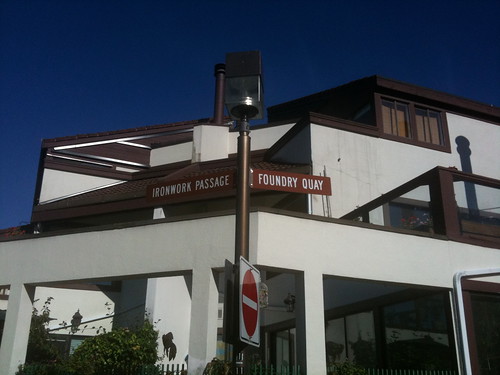
Then I went for a walk. The weather was still sunny and fine, so I moseyed along the seawall towards Charleston Park and Stamp’s Landing. Very pretty neighbourhoods, with a spectacular view—close to downtown, close to everything, lots of bike and pedestrian access, what’s not to like? If I’d had my camera I would have taken more pictures, but all I had was was my dying iPhone. Still, here’s something, mostly because it intrigued me:

Ironwork Passage & Foundry Quay

Ironwork Passage & Foundry Quay

Now those are some weird street names for such a residential neighbourhood. But then I thought back to the history exhibit, especially this map right here (the museum had a colour version). Back in the day, this place, as well as Yaletown, were places of industry. Did you know there used to be a rail bridge linking downtown and what’s now Vanier Park? How things change. Nowadays, the only train you’ll see in Yaletown is the old locomotive in the Roundhouse.

Had another blast from the past in Stamp’s Landing, too, but that’ll have to wait for another day. It’s a much longer story, and not connected to WordCamp.

Progress means…

In the last two years I completed the VGVA.com redesign, to much applause; I began and will soon finish another redesign, which introduced me to an honest-to-gawd CMS (WebGUI, to be precise). And yes, I already knew Wordpress, but I’d only adopted that in the previous year. Recently I’ve begun two more projects, one (volunteer) as part of a team of developers, another as the solo tech guy for a fledgling online commercial venture.

Hey, remember when I wrote

How much do I really know about Web design? Sure, I read a lot of designers’ blogs, but I’ve got exactly two sites under my belt: this one right here, plus another one for an online RPG I’m no longer a part of, that I redid maybe six years ago. That’s it. Just two. Not a great portfolio. A lot of people will be judging this, and judging me on it. Am I really up for this challenge?

In the last two years I completed the VGVA.com redesign, to much applause; I began and will soon finish another redesign, which introduced me to an honest-to-gawd CMS (WebGUI, to be precise). And yes, I already knew WordPress, but I’d only adopted that in the previous year. Recently I’ve taken on two more projects, one (volunteer) as part of a team of developers, another as the solo tech guy for a fledgling online commercial venture.

I’m fretting especially about project (b), because though it may be possible to implement it in WordPress, we’re still hammering out the requirements and I may have to turn to Drupal. Which would mean learning Drupal. On the other hand I’ve been meaning to do so for a while now, not least of which because it’s an extremely marketable skill, and now I have a good excuse. On the gripping hand it’s intimidating, because the project’s bigger and the stakes are higher.

So yeah, the fears and doubts are still there. The difference is, my comfort zone is much larger now, and I’m getting insecure about bigger and scarier things.

And that, my dears, is progress.